
Case study How LicenseManager.dev ships AI-generated code safely with feature flags
Who is LicenseManager.dev?
LicenseManager.dev helps developers sell desktop apps without building a licensing backend. Their promise is simple: "Sell your desktop app. We handle the license keys." Every Stripe purchase or subscription creates a license and emails the key to the customer. The app then validates the key with a single HTTPS request and verifies a signed token offline.
On top of that, LicenseManager.dev offers a customer portal for lost keys, machine swaps and refunds, along with analytics, an audit log, a REST API, and SDKs for Electron, Tauri, TypeScript, Go, Python, Ruby, Java, C# and PHP.
That is a broad product for a lean team. Every bug report, feature request and SDK improvement competes for the same few hours of engineering time. To keep up, LicenseManager.dev turned to AI coding agents, and to Tggl to keep those agents under control.
The challenge: AI writes code faster than humans can review it
Modern AI coding assistants and autonomous agents can read a ticket, understand a codebase and open a pull request in minutes. For a small team, this is a huge opportunity: the backlog of small bugs and "nice to have" features can finally shrink.
But AI-driven development comes with its own set of challenges:
- Trust: large language models (LLMs) produce code that looks right but can hide subtle bugs, especially around edge cases like billing, licensing and authentication.
- Review bottleneck: reading a diff is not the same as seeing a feature work. Reviewing AI-generated code line by line quickly becomes the new bottleneck.
- Staging is not production: a license validation flow depends on real Stripe events, real customer data and real desktop apps in the wild. A staging environment can only approximate that.
- Blast radius: if a bad AI-generated change reaches all customers, apps may fail to validate their license keys. For a licensing platform, that is a critical incident.
LicenseManager.dev wanted the speed of agentic software development without giving up control over what their customers see.
Before Tggl: AI as a glorified autocomplete
At first, AI was used the same way most teams use it: as a coding assistant inside the editor. Developers prompted the model, copied the suggestions, and pushed the result through the usual review and deployment process.
This approach kept humans in control, but it barely moved the needle. The AI could write code quickly, but every change still had to be manually tested on staging, merged, and released all at once. Any mistake meant a hotfix and a new deployment. As a result, the team stayed cautious and only trusted AI with trivial changes.
The real question was not "can AI write the code?" but "how do we safely put AI-generated code in front of a human, in production, before it reaches our customers?"
The solution: an AI release pipeline powered by feature flags
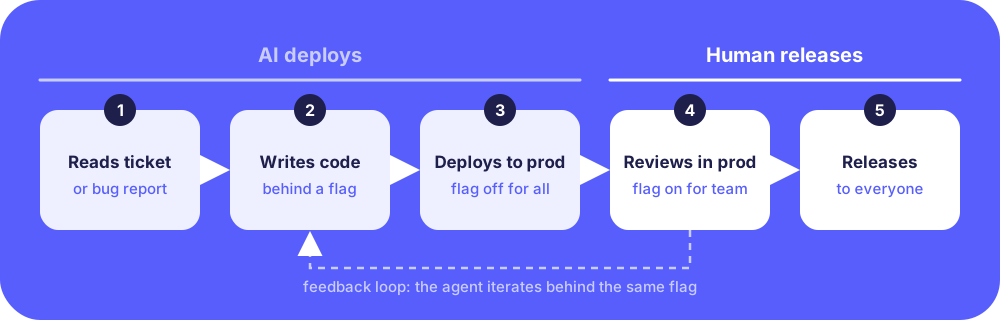
LicenseManager.dev redesigned its workflow around one simple rule: every change written by the AI ships behind a feature flag. The AI is allowed to deploy, but it is never allowed to release. Releasing stays a human decision, made in Tggl.
This is the core idea of decoupling deployment from release: code can be in production, on real servers, without being visible to customers.
Step 1: the AI agent reads tickets and bug reports
The process starts where work already lives: in the ticketing system. When a bug report or a feature request is ready, the AI agent picks it up, reads the description, the customer reports and the relevant parts of the codebase, then plans the change.
Because LicenseManager.dev exposes SDKs in many languages, many tickets are repetitive by nature: "support this option in the Go SDK", "handle this Stripe event", "show this field in the customer portal". This is exactly the kind of well-scoped work where AI agents shine.
Step 2: the AI writes the code behind a feature flag
Instead of modifying the existing behavior directly, the agent wraps the new code path in a feature flag. The old behavior remains the default, and the new behavior only runs when the flag is enabled.
The agent then opens a pull request that includes both the code and the flag. Automated tests run in the CI pipeline, and once they pass, the change is deployed to production through the usual CI/CD pipeline.
At this point, the AI-generated code is live on production servers, but no customer is affected. The flag is off for everyone.
Step 3: a human reviews the feature in production
This is where Tggl changes everything. Using targeting rules, the team enables the flag only for themselves: their own accounts, a test app, or a handful of internal licenses.
Rather than reviewing a diff in the abstract, a human reviewer can now test the feature in production, on the real environment, with real Stripe webhooks, real license validation and real desktop apps. If something feels off, they send feedback back to the AI agent, which iterates on the same branch, behind the same flag.
This "human-in-the-loop" step is what makes AI-generated code trustworthy. The reviewer does not need to understand every line the model wrote. They need to confirm that the feature works as expected, in the place where it actually matters. Read more on this approach in our article on testing in production.
Step 4: releasing to everyone with a click
Once the feature is validated, the team uses the same flag to release it. Depending on the risk, they either turn it on for everyone at once or use a progressive rollout to gradually expose the change to a growing share of customers while monitoring errors and support tickets.
No new deployment is needed. Releasing is a decision made from the Tggl dashboard, instantly reflected on the servers.
Step 5: rollback and cleanup
If a problem slips through, the flag doubles as a kill switch. One click turns the AI-generated code path off and restores the previous behavior instantly, without waiting for a revert and a redeployment.
Once a feature has been fully released and stable for a while, the flag is no longer needed. Cleanup is also a well-scoped task, so it goes back to the AI agent: it removes the flag from the code and opens a pull request. Tggl's technical debt management helps the team spot flags that are ready to be removed, so AI-driven releases don't turn into an ever-growing pile of stale flags.
Why feature flags are essential for AI-generated code
LicenseManager.dev's experience highlights why feature flags and AI coding agents work so well together:
- Deploy is automated, release is human: the AI can push code to production as often as it wants, but only a human decides when customers see it. This is a natural guardrail for any agentic workflow.
- Review the outcome, not just the code: validating a feature in production is faster and more reliable than reading every line an LLM produced.
- Small blast radius by default: every AI-generated change starts with zero exposure, then grows only when humans are confident.
- Instant rollback: a kill switch is the best safety net when you are not the one who wrote the code.
- Full traceability: Tggl's audit log records who enabled which flag, when, and for whom, so the team always knows which human approved which AI-generated change.
For teams that need an extra layer of control, Tggl's Reviews feature can require a second person to approve any flag change in production, applying the four-eyes principle to AI-driven releases as well.
Results and impact
By combining AI coding agents with Tggl's feature flags, LicenseManager.dev transformed the way it ships software:
- AI handles the backlog: bug fixes, SDK improvements and small features are now written by AI agents, freeing the team to focus on product direction and customer conversations.
- Faster validation: features are reviewed in minutes on the real production environment, instead of being manually tested on staging.
- Zero customer impact during review: unfinished or incorrect AI-generated code never reaches customers, because every change ships disabled.
- More frequent releases: since deploying is no longer risky, code reaches production continuously, and releases happen as soon as a feature is validated.
- Increased confidence: the team trusts AI with more ambitious changes, knowing that any mistake can be contained and rolled back instantly.
Recommendations for teams adopting AI-driven releases
Based on LicenseManager.dev's experience, here are a few best practices for teams who want to let AI agents ship code to production:
- Make feature flags mandatory for AI-generated code: add it to the agent's instructions. Every new behavior must be wrapped in a flag that defaults to off.
- Use one flag per ticket: it keeps changes isolated, easy to review and easy to roll back independently.
- Target internal users first: always validate AI-generated features on your own accounts in production before exposing them to customers.
- Keep humans in charge of releases: let the AI deploy, but reserve the release decision to humans. Use Reviews if you need formal approval.
- Let the AI clean up after itself: removing a fully released flag is a perfect task for an agent. Read our guide on how to remove old feature flags without breaking your code.
Frequently asked questions
Is it safe to deploy AI-generated code to production?
It is, as long as deploying does not mean releasing. By shipping AI-generated code behind a feature flag that is disabled by default, the code can be deployed to production without affecting any customer. A human then validates the feature in production before releasing it.
How do you review code written by an AI agent?
Code review is still useful, but it is not enough on its own. The most reliable way to review AI-generated code is to test the actual feature in the real environment. Feature flags make this possible by enabling the new code only for the reviewer.
What is human-in-the-loop for AI coding agents?
Human-in-the-loop means that an autonomous AI agent does the work, but a human remains responsible for key decisions. In an AI release pipeline, the agent writes and deploys code, and a human decides when the feature is released to users.
Can feature flags be used with any AI coding tool?
Yes. Feature flags are independent of the AI coding assistant or agent you use. As long as the agent can follow instructions to wrap new code in a flag, Tggl's SDKs take care of the rest.
Conclusion
AI coding agents are changing how software is written, but they don't remove the need for human judgment. LicenseManager.dev, the license key management platform for desktop apps, found the right balance: let AI read tickets, write code and deploy it continuously, and keep humans in charge of what customers actually see.
With Tggl, every AI-generated change becomes a safe, reversible experiment. Features are validated in production by real people, released with a click, and rolled back instantly if needed. For any team looking to adopt AI-driven development without compromising reliability, feature flags are the missing piece.